Showing posts with label Privacy. Show all posts

14.10.09

The Best Free Spam Filter


Free Spam Filter for Outlook / Express and Thunderbird

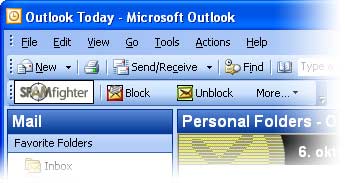
SPAMfighter
has partnered up with Microsoft to build the strongest, safest, and most effective anti spam filter on the market. If you use Outlook, Outlook Express, Windows Mail or Thunderbird and you want to get rid of spam, just install SPAMfighter. And if you use it at home, it's 100%free.

Key Features:

  • SPAMfighter Standard is 100% free for home users
  • Award winning spam filter technology
  • Protects against "phishing", identity theft, and other email fraud
  • Free automatic updates 
  • Used by more than 6 million happy users around the World
  • Protects all the email accounts on your PC
  • Unique language filtering tool that empowers you to stop emails written in specific languages
  • Unique picture filter that can recognize spam which is sent as a picture
  • Automatic "real mail" protection - means no lost business mails!
  • Blacklist domains and emails
  • Spam Abuse Reporting with one click
  • Automatic Whitelist management
  • Privacy Guaranteed - we don't see any of your email
  • Does not filter based on simple phrases or "trigger" words. Allows any content
  • Language support: English, German, Spanish, Chinese, French, Italian, Greek, Dutch, Swedish, Norwegian, Suomi, Russian, Bulgarian, Portuguese, Japanese, Czech, Thai, Vietnamese, Turkish and Danish 
Operation system: 98, ME (32 bit), 2000, XP or Windows Vista (32 bit)
Email client: Outlook 2000/2002/2003/2007, Outlook Express 5.5 or later, Windows Mail and Mozilla Thunderbird 2.0


12.10.09

Freeware to Hide Folder


Hide Folder HiBit is a freeware to Hide, Lock, Encrypt, undelete or Recycle folder or file in 1 second!

Main features:

· Protect any folder or file by : Hide, Lock, Encrypt or make a folder as a recycle Bin.
· The protected folders or files still protected even in other computers.
· The protect Operation just take 1 second at any computer.
· You can undelete the folder or file by Locking it.
· Works with FAT32, FAT16, FAT12 and FAT and all windows versions.

Some Technical Information:

· FileSystem: NTFS, FAT32 and all other file systems
· More security: We advice you to use HiBit to hide folders or files on FAT32 if you want more security, this because the folder or file hidden by HiBit on FAT32 FileSystem will not be changed and still in hidden status on other PCs and computers, or other platforms like UNIX and other windows versions.
· Fastness: if you want more fastness and don't care for more security on other platforms and other PCs you can use HiBit on NTFS filesystem.
· Large Files: there is no relationship beween HiBit speed to hide folder and the size of that file, but a large number of files into that folder may confuse HiBit and make it runs slow in compare of usual times.
· Removable Disks: HiBit it is a perfect solution for Portable and removable disks because you may use a removable disk in another computer, if you do that you will notice that your secret files/folders still hidden there.
· Fake Folder: you can use 'Fake Folder' function to fake your folder with another system folder form(system folders like My Compter, Recycle Bin etc.. folders), if someone opens your secret folder he will be taken to another system place, the folder still faked even on other computers.

Hide Folder HiBit is freeware but: runs 10 trial and nag screen until registration. Registration is free. Compatible All Windows. Download 1,7 Mbytes.

11.10.09

Hide Windows by a Click


ClickGone Open Source, very fast way to hide windows by clicking them. Also has a boss key feature that hides the active window and mutes the sound, a hide in system tray, "Hide" and "Priority" menu item in the applications system menu (Where it asks you to Close through the taskbar). No install, ClickGone  is portable and FREE.

Clicky Gone allows you to hide your selected windows from view; this includes the taskbar button associated with the application. This utility particularly helps with protecting your privacy by hiding things like your browser with banking details up and someone walks in on you.

Features:

    * Click and Hide by holding down keyboard modifiers
    * Run hidden windows application's in the background, i.e Low priority
    * Toggle all windows to hide and show
    * Boss Key support, hide the active window and mute the sound
    * A fancey menu that shows you all your hidden windows
    * Prevent click hiding on full screen applications, i.e. Games
    * Hide menu on applications caption and taskbar icon
    * Process priority menu on applications caption and taskbar icon
    * Hide windows in system tray or completely from view
    * Prevent stuborn windows from showing up after they are hidden, i.e. a long task completes and the application shows another window from the one you have hidden.

Compatible: Win 2000/XP/Vista. Download 830 Kbytes. No virus, no spyware, no worms.

9.10.09

Delete Recently Opened Files


Each time that you open a file from Windows Explorer or from a standard open/save dialog-box, the name of the file that you opened is recorded by the operating system. Some of the names are saved into the ´Recent´ folder. Other are saved into the Registry.

RecentFilesView display the list of all recently opened files, and allows you to delete unwanted filename entries. You can also save the files list into text/html/xml file.

RecentFilesView doesn't require any installation process or additional dll files. In order to start using it, simply run the executable file (RecentFilesView.exe)
The main window of RecentFilesView display the list of all files that you recently opened. You can select one or more items, and then save them into text/html/xml file. You can also delete unwanted entries by using 'Delete Selected Items' option. 
This utility works on any version of Windows, from Windows 98 to Windows Vista. Light download: 36,6 Kbytes.

6.10.09

Freeware to delete past computer activities


Free Internet Eraser, an Internet privacy software that protects your Internet privacy by permanently erase internet history and past computer activities. Even though, many of the tasks can be performed manually, Free Internet Eraser can automate this process for you.

Free Internet Eraser allows you to erase history, erase Internet history, internet cache, cookies, address bar search history of your browser, and Window´s temp folders, run history, search history, open/save history, recent documents and more. In addition, you can have Free Internet Eraser automatically clean your files when Windows is started or shutdown.

Free Internet Eraser implements the US Department of Defense DOD 5220.22-M and NSA clearing and sanitizing standard, to gives you confidence that once deleted with Free Internet Eraser, your file data is gone forever and can not be recovered.

Main Features:
    * Delete Internet Explorer Cache Files
    * Delete Internet Explorer Browser History
    * Delete Internet Explorer Cookies
    * Delete Internet Explorer Address Bar History
    * Delete Windows Recent Documents History
    * Delete Windows Start Menu Run/Find History
    * Delete Windows Open/Save History
    * Delete Windows Registry Streams
    * Delete Windows Clipboard
    * Delete Windows Recycle Bin
    * Delete Windows Temporary Files Directory
    * Delete Windows Wordpad Recent File List
    * Delete Windows MediaPlayer Recent File List
    * Secure delete files &folders
    * Scheduled Tasks & Windows Startup Manager
    * Free space on your Hard Drive!
    * Speed up your computer!
    * And much more...


Compatible: Win 98/ME/2000/XP/2003/Windows 7. Download 884 Kbytes.

4.10.09

Block Executable File With Password


LockAnEXE, a free, simple program lock, that lets you 'lock' down executable files and prevents them from being opened. Simply click 'Open File' and browse to the program EXE or the setup EXE. Click the option you prefer and click 'Do It' to lock or unlock the EXE.  It is simple, yet efficient exe lock.


1.10.09

A Password to Protect Windows Executable Programs


KaKa ExeLock is a useful software, which allows you to password protect Windows executable programs. It works on the program files that are 32-bit Windows-9X/NT/2000/XP/ME executables. Usually those files are stored on your system with default .EXE file type.

Easy to use:
  • Not change the size of protected file.
  • Not change the icon of protected file.
  • The protected exefile will still work fine in a different machine
  • Safe and efficient.Not run in the background to provide its functionality

    OS: Windows 2003/XP/2000/NT/ME/98
    File Size: 190Kb
    License: free

Freeware Folder Protector with Password


KaKa Folder Encryption is a powerful and easy-to-use program for encrypting and protecting your data. You can encrypt any folder including flash disk and removable hard disk.

Features:

    * Fast and Simple: With one-click encryption and decryption. Instant encryption and decryption
    * Strong Encryption Algorithm: Using the Original encryption technology that can effectively protect your data.
    * Encrypted folders are characterized by protection against copy, deletion or real size check.

Compatible Win 98/ME/NT/2K/XP/2K3/Vista. Download 688 Kbytes.


17.9.09

Protect your privacy on internet


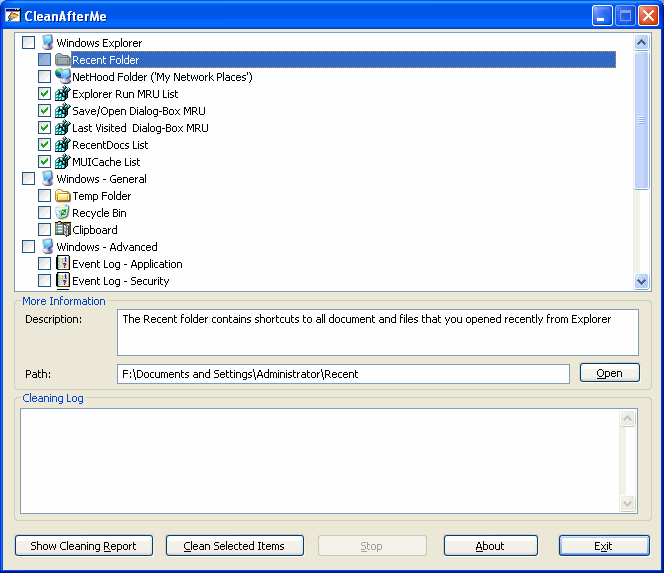
CleanAfterMe, simply freeware allows you to easily clean files and Registry entries that are automatically created by the Windows operating system during your regular computer work.

CleanAfterMe cleans the cookies/history/cache/passwords of Internet Explorer, the 'Recent' folder, the Registry entries that record the last opened files, the temporary folder of Windows, the event logs, the Recycle Bin, and more.

CleanAfterMe is a portable application. This means that you can run it without any installation and without leaving any trace in the Registry.
You can also run this program from a USB flash drive: In order to do that, simply copy the executable file of CleanAfterMe (CleanAfterMe.exe) into the USB flash drive, and run it from there.  It works under Windows 2000, Windows XP, Windows Server 2003, and Windows Vista.


It is still possible to switch to Windows 10 for free

Microsoft, with Windows 10, had decided to distribute it almost for free to those who already had Windows 7, Windows 8 and 8.1 on their PC. ...